


When it comes to online publishing, WordPress beats every other platform with its superior yet simple workflows. That isn’t marketing speak, because WordPress powers over 40% of the web for a reason. The platform’s success comes from its plug-and-play architecture: install a plugin, and suddenly your site can do something it couldn’t do a short while ago.
What about those dozens of posts sitting in your archives? They don’t have to just live there. They can become eBooks with content that is reworked, organized and ready-to-share as PDFs, without you ever leaving WordPress.
But when most people decide to create an eBook, they don’t think about WordPress. They think about Google Docs. And that’s where the trouble starts.
Some people power through. Most people take a break and never come back.
The Friction of Writing eBooks Outside WordPress
Let’s be honest about the traditional workflow for creating an eBook from your blog content:
The Google Docs Approach:
- Open 20+ blog posts in separate browser tabs
- Copy content from each post into your Google Doc, one by one
- Manually download and re-upload images (because they didn’t copy over)
- Lose track of which posts you’ve already copied
- Realize halfway through that you forgot an important post
- Export to PDF and discover more issues
- Go back to fix it
- Export again
- Find more problems
- Wonder why you started this project
Sounds familiar?
The problem isn’t that you’re not organized enough. You just need a different tool.
Google Docs was built for writing new documents, not for compiling existing content. When you try to force it into that role, you end up fighting against how it wants to work.
The Scale Problem
When you’re working with just 3-4 posts, this workflow is merely annoying. You can push through in an afternoon.
However, for a large number of posts, you’ll be faced with copy-paste drudgery. If you need to update something later, you have to hunt through your 50-page Google Doc to find the right section and make edits.
This is why most bloggers never turn their content into eBooks. Not because they don’t want to. Because the logistics are exhausting.
Advantages of WordPress for eBook Creation: Content, Media, and Workflow
Here’s what changes when you create your eBook directly in WordPress with the eBook Crafter plugin:
Your content is already there. Every post has a title, content, images and formatting. and you’re organizing what already exists.
There’s no downloading and re-uploading of images, because your entire media library is already attached to your posts.
eBook Crafter will let you see everything at once, and editing stays in one place.
The Gather → Craft → Publish Workflow
Let me walk you through what this actually looks like in practice with the eBook Crafter plugin.
Step 1: Gather Your Posts
Open eBook Crafter and you’ll find your entire post library.
Now check the boxes next to the posts you want to include. Want 5 posts? Check 5 boxes. Want 30 posts? Check 30 boxes, and click the Add Chapter(s) button.
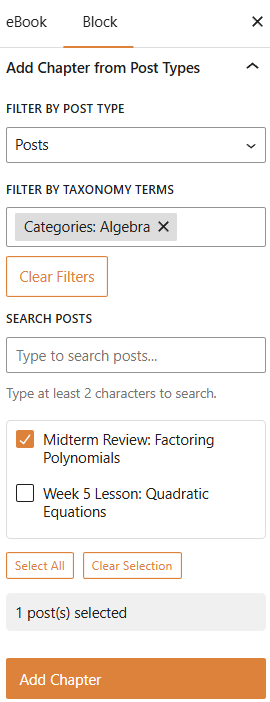
You can search or filter by category.
When you’re trying to compile content from across months or years, being able to see everything in one searchable interface is huge.
Step 2: Organize, Edit and Craft
Move your selected posts into the order that makes sense, using the familiar block editor controls of WordPress.
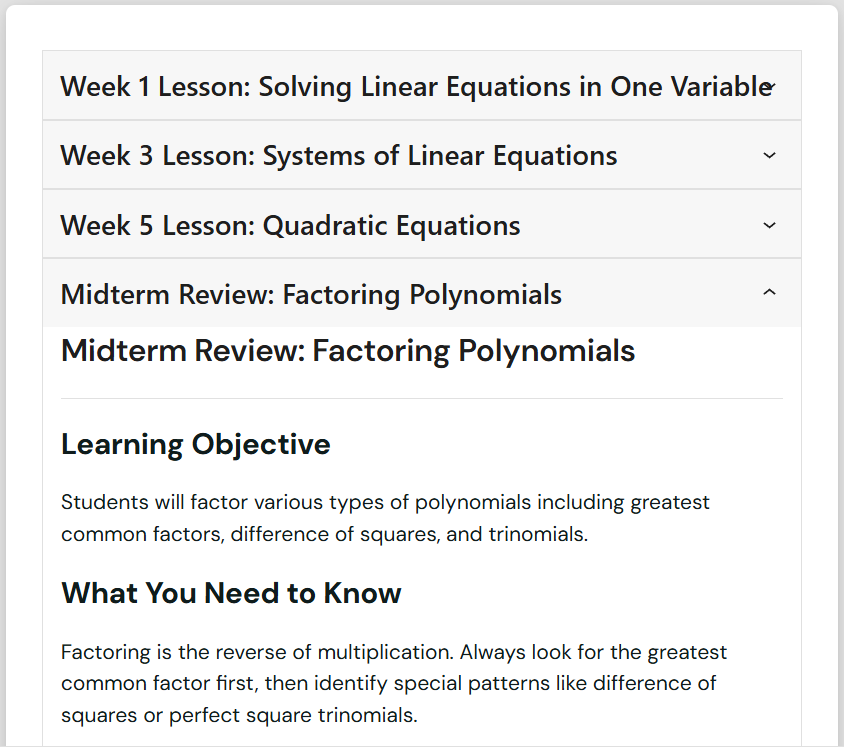
Need to edit something before it goes into your eBook? Just expand the relevant chapter and add your edits using the allowed blocks.
Add a chapter introduction, update outdated statistics, remove “in next week’s post” references and insert page break using the page break block.
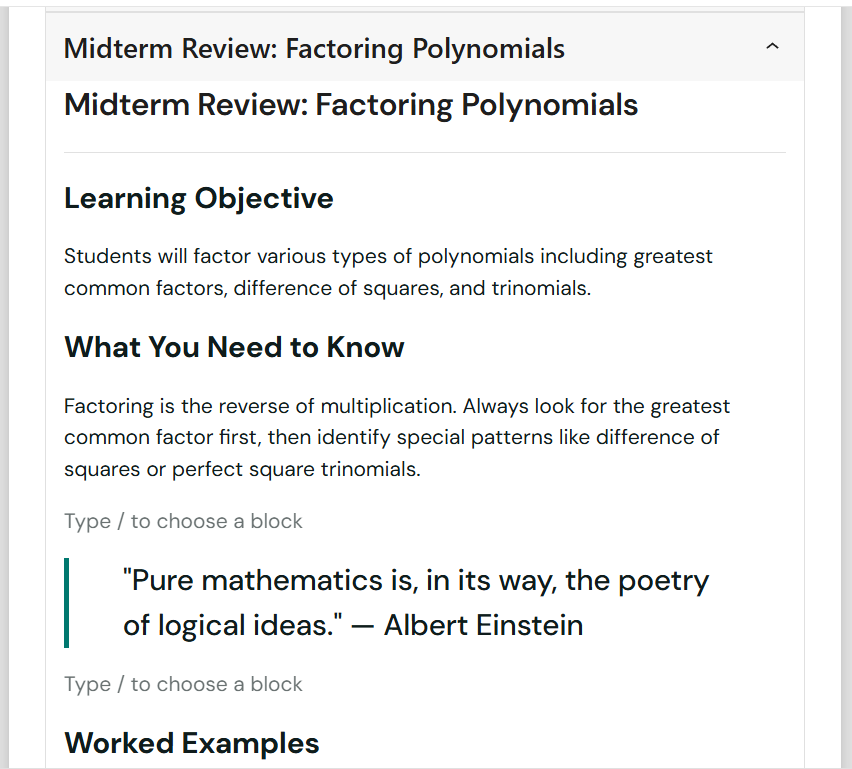
You’re editing only a copy. Your original published post stays untouched.
Step 3: Configure, Export to PDF and Publish
Click “Generate PDF” from the Build tab and wait for a while. Your eBook will be ready soon.
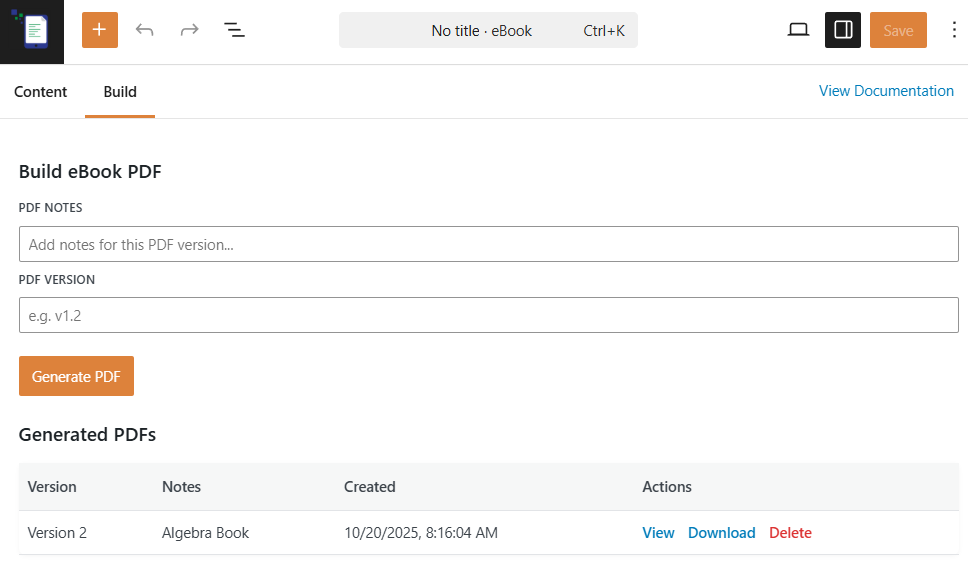
When it’s done, your PDF is automatically saved to your WordPress media library. From there, you can download it, share it, sell it, or gate it behind a membership.
Distribution: Getting Your eBook to People
Your eBook lives where your website lives. That means you can:
- Offer it as a lead magnet – Connect your opt-in form to automatically deliver the PDF when someone subscribes.
- Sell it as a product – Add it to WooCommerce or Easy Digital Downloads. Your payment processing is already up and running.
- Gate it for members – Upload it to your media library and restrict access with your membership plugin.
Once the friction disappears, you start thinking differently about eBooks. Let’s say you’ve been blogging for two years and have 80 posts. You could create:
- A “Getting Started Guide” from your 15 beginner posts
- An “Advanced Techniques” eBook from your 12 expert posts
- A “Case Studies Collection” from your 10 real-world examples
- A “Best of 2025” compilation from your most popular posts
That’s four different eBooks, each serving a different audience, each usable as a lead magnet or product. And because the workflow is simple, each one will take a fraction of the time you’d otherwise need.
All along, you own the entire process!
Try It Risk-Free
Want to see if this workflow works for you? Pick ten of your best posts and turn them into an eBook this week.
Here’s the deal: Try eBook Crafter free for 14 days. Just install it, select your posts, and see how quickly you can go from idea to finished PDF eBook.
If you decide to keep using it after the trial, you still get another 30 days to request a full refund if it’s not working for you.
That’s 44 days in all, plenty of time to create an eBook, test the workflow, and decide if it makes sense for you. No pressure!
I am confident this workflow will turn months of “I should do this” into an afternoon of actually doing it.
