
eBook Crafter’s code is licensed under the GPL-2.0. Your license key controls how you obtain services, namely, updates, downloads and technical support.
We partner with Freemius to securely handle checkout, subscription billing, license activations and delivery of updates and support. Freemius is a managed eCommerce platform for reselling WordPress plugins and a reputed merchant of record. Your license key proves you are entitled to those services. It does not restrict your right to run, modify or extend the plugin in accordance with the terms permitted by GPL 2.0.
What your License Includes #
- Updates through the WordPress dashboard, your account and the plugin download link in your email.
- Ability to use the plugin and technical support while your license key is active.
- Site activations corresponding to your plan.
Where you can Activate your License Key #
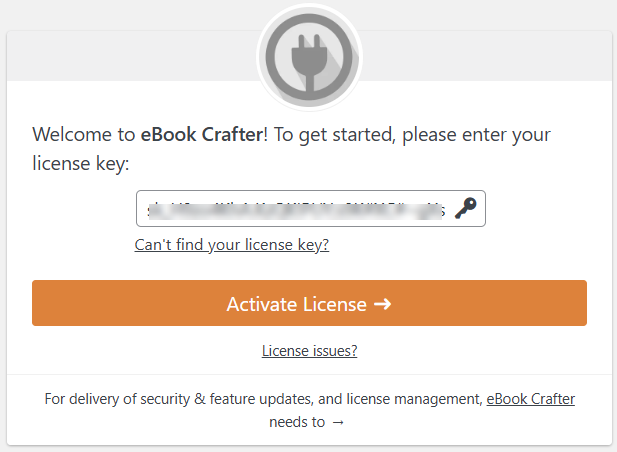
- Production and localhost setup: All generated license keys can be activated on localhost/staging/dev environments without the need to purchase additional licenses.
- To activate your license, go to Dashboard > eBook Crafter after installing the plugin, and enter the license key in the field provided. Upon clicking Activate License, the features of the plugin will be available under the eBook Crafter menu.
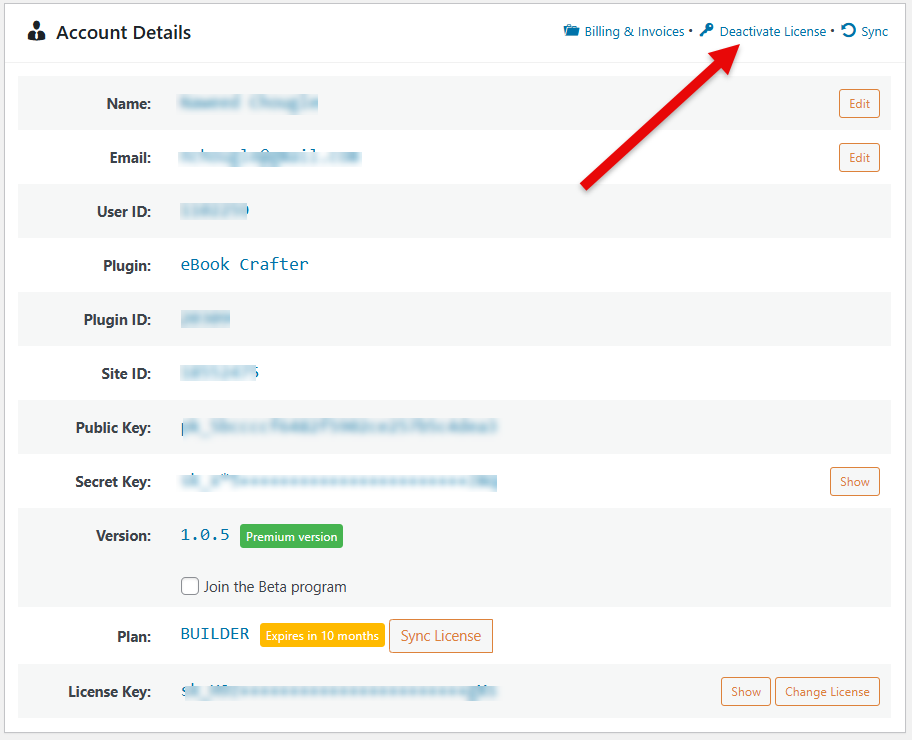
- To deactivate your license and use it on another site, go to eBook Crafter > Account and click Deactivate License. Next, follow step 2 to activate it on your new site.
- Once a license key has been deactivated or reached its expiry date, the plugin’s features will no longer be available, and your copy of eBook Crafter will not be eligible for future updates and support. You can resume using eBook Crafter’s features upon renewing your subscription.
Clones, Migrations and Safe Mode #
- Freemius links every install of eBook Crafter to your site URL and issues install tokens. When you clone or migrate your site, the SDK will detect the duplicate and can enter safe mode for you to resolve or reauthorize cleanly. If you see a message saying “this looks like a clone”, follow the prompts to relink your site.
Two websites should not be assigned the same ID and keys, since actions on one website will impact the other, resulting in unexpected behaviors. This may include a disruption in automatic updates.
Staging Domains and Localhost Instances Recognized for Free Usage #
The following are recognized as staging or localhost instances:
TLDs that are considered as dev or staging:
*.dev
*.dev.cc (DesktopServer)
*.test
*.local
*.staging
*.example
*.invalid
Subdomains that are considered as dev or staging:
local.*
dev.*
test.*
stage.*
staging.*
stagingN.* (SiteGround; N is an unsigned int)
*.myftpupload.com (GoDaddy)
*.cloudwaysapps.com (Cloudways)
*.wpsandbox.pro (WPSandbox)
*.ngrok.io (tunneling)
*.mystagingwebsite.com (Pressable)
*.tempurl.host (WPMU DEV)
*.wpmudev.host (WPMU DEV)
*.websitepro-staging.com (Vendasta)
*.websitepro.hosting (Vendasta)
*.instawp.xyz (InstaWP)
*.wpengine.com (WP Engine)
*.wpenginepowered.com (WP Engine)
dev-.pantheonsite.io (Pantheon) test-.pantheonsite.io (Pantheon)
staging-.kinsta.com (Kinsta) staging-.kinsta.cloud (Kinsta)
*-dev.10web.site (10Web)
*-dev.10web.cloud (10Web)
Additionally, if your domain is localhost (with any port), it will also be treated as a localhost domain.
Privacy and the Opt-in Screen #
- On first activation, you will see a dialog asking if you would like to opt for data-sharing. Opting in improves how we provide support and assess usage analytics. You can choose to skip opting in.
- To know more about Freemius’ data collection policy, please visit their documentation page on privacy and data collection practices: https://freemius.com/privacy/data-practices/
Billing and Emails #
When you make a purchase through our website, emails will be sent with your license key and download link. Access to the download and the ability to install it will be available right away.
Frequently Asked Questions #
#
Legal & Billing #
Is the license required to run the plugin?
Yes, the license key will be required to run the plugin and its features, as well as obtain updates and support. The code remains GPL compliant.
Will staging domains use up my site limit?
No. Recognized dev, staging and local installations are free. Please refer to the section titled “Staging Domains and Localhost Instances Recognized for Free Usage”.
How do I transfer the license to a new domain?
Deactivate the license key on the old site through Dashboard > eBook Crafter > Account, then activate it on the new one.
What if my subscription payment fails?
The Freemius platform will make multiple attempts to obtain the payment if it fails and send you an email reminder as well.


